
Whether you’re selling products at local markets, small boutiques, or national retail chains, your product label tells your brand story, builds consumer trust, and differentiates your product from the competition. A confusing or low quality product label can sabotage these goals and steer your customers to the competition. Designing an attractive and professional product label is the best way to make sure your product stands out.
Today, there are many ways to design a product label, including online graphic design tools, hiring a graphic designer, and using professional label design software. The best way to design your product labels depends on your goals. If accuracy, efficiency, and cost are important to you, then professional label design software is the way to go.
TRY CODESOFT LABEL DESIGN SOFTWARE
This blog will share easy ways to incorporate images into your product labels to help them stand out, while making your label design process easy and accurate.
The images you choose tell your brand story. They may literally describe your product or convey a meaning that symbolizes your brand. Before jumping right into your label design, take some time to brainstorm the right types of images to include on your label. Consider the following:
What style matches your brand? You wouldn’t use a black and white label on a children’s brand, and you wouldn’t use cutesy artwork on an athletic performance brand. The right style communicates to your customer what your brand is all about.
What’s the right color scheme for your brand? Colors have powerful subconscious associations, so it’s critical to do your research. Keep in mind that these associations are cultural and may be different in various locations or cultural groups.

Source: Adobe’s Guide to Color Meaning
The image is a vital part of your label, but it’s not the only important part. Your product label must also accurately identify the product, its variety, and any legally required information. Most stores also require a 1D or 2D barcode to enable cashiers to quickly scan the item at checkout.
Graphic design software is the best tool for creating your images, but it can’t replace a professional label design tool for managing variable data, generating compliant barcodes, and ensuring accurate label printing.
While graphic design software excels at making attractive artwork, it falls short when it comes to building an efficient label printing process. Why? Let’s dig in.
Variable data can include product varieties, like colors, flavors, or scents, and it can include data that changes on every package, such as expiration date, serial number, or shipping address.
To handle product varieties in graphic design software, you’ll be creating separate design files for each version. That might not seem like a problem when you have three varieties, but as your business grows, the product varieties increase and become more complex. When it’s time to update your label layout, you have to carefully change dozens of files or recreate them from scratch.
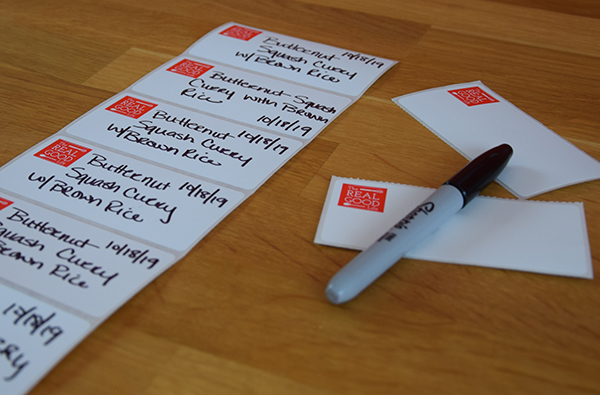
To handle data that changes on every package, the most common solution in graphic design software is to leave a blank space to handwrite the data after printing. Not only does this mean that customers have to read your handwriting, it also means mistakes can easily be made.
Professional label design software is designed around the need for variable data. From print time forms to database connections, there are many ways to turn one label template into endless printed label variations.
To most people, all barcodes look similar...they’re just lines, right? While graphic design software might offer a few of the most common barcode types, there are actually dozens of barcode symbologies used for various purposes in industry and retail. A barcode’s symbology is like its font, and it allows the scanning device to decode the data. Choosing the right barcode symbology is critical, because it determines who is able to scan the barcode. Typically, your buyer will provide barcode and label specifications that define the acceptable barcode symbology.
Behind the symbology is the actual data encoded in the barcode. In theory, if you’re only using barcodes within your business, you could use any data. But most businesses sell to retailers or distributors who need to automatically identify your product by scanning the label. Your buyer may provide specifications for this data, but for maximum compatibility across the supply chain, you’ll need to leverage GS1 standards. GS1 standards are rules for the data inside of barcodes that ensure different companies can accurately gather data from barcodes.
Get started by licensing a GS1 Company Prefix or a GS1 US GTIN. TEKLYNX partners with GS1 US so you can get authentic UPC Numbers (GTINs) directly through GS1 US by clicking the appropriate link below. You will be taken directly to the GS1 US store.
Did you know? Soon, 2D barcodes will be commonly used at checkouts in retail stores. GS1 has announced an initiative to transition to 2D barcodes called Sunrise 2027. 2D barcodes, such as QR codes and data matrix, hold more data, are more secure, and less error-prone than traditional 1D barcodes. Learn more about the impact of 2D barcodes.
TEKLYNX barcode label design software includes all common barcode symbologies, and many less common ones too. Adding a barcode to your label is easy with the barcode wizard. The GS1 barcode wizard adds compliance by structuring your barcode data to comply with GS1 standards and alerting you if anything is missing.
Printing directly from graphic design software requires technical knowledge. Even if you’re familiar with printing on desktop printers, label printers introduce a new learning curve.
Some graphic design tools, especially online ones, offer to print your labels for you. If you need a large quantity of labels where the design isn’t going to change before they run out, this might be a decent option. But keep in mind: unexpected label changes are always possible.
You could order small quantities of labels at a time to reduce the risk of obsolete labels, but they can cost three or four times as much per label! Not to mention, you’ll have to wait 7 to 10 business days for shipping or pay a premium to get them sooner.
For most companies, printing labels in-house is the most cost-effective long-term solution. With a quality label printer and professional label design software, your company can print exactly the labels you need when you need them. This reduces costs, eliminates the risk of obsolete labels, and speeds your time to market.
While graphic design software is the best tool to create polished graphics, professional label design software has the features you need to make your label printing process accurate and efficient. Let’s talk about how to combine them.
CODESOFT label design software from TEKLYNX offers all the features mentioned above and more for efficient label printing. Plus, it’s easy to link your artwork files to your label template. Here’s how:

If your image covers most of the printed label and doesn’t change with the variety, use the background picture feature in CODESOFT. Go to File > Properties and select Extended. Check the box for Background picture and browse to the file location. Configure the settings and click OK.
Remember to leave room in your background image for the variable data that will be added by your label design software. This could include the product variety, product weight, ingredients list, nutrition facts, safety statements, and barcode for checkout. Many companies are now including a consumer scannable QR code to bridge the physical and digital brand experiences and offer more information to savvy customers.
If you need to make changes to your background image, simply re-save the final image in the same location with the same name as the original image. CODESOFT will read the new image and automatically update the label design.
If your image is only a portion of the label or changes with the variety, you may want to add the image as a regular object. Once the image is added and placed, it can even be locked so you don’t accidentally move it while designing the rest of your label.
Any object on your CODESOFT label can be variable – even images. Variable data is generally stored in a spreadsheet or database. While the image file itself is not usually saved in the database, the file path to its location can be stored as text. When you select the database record you wish to print, the image in the associated location will be selected.
Although many small businesses outsource their label printing, there are countless benefits to printing labels in-house.
Some businesses try to have the best of both worlds with a two-step label printing process: a background design printed by an external vendor, and variable data printed on top of the design in-house. This method is just as risky as outsourcing the entire process, as it can result in the same time delays, label waste, and unmet quality expectations.
Once you’ve decided to print your product labels in-house, you’ll make an upfront investment that will pay off in the long run: label design software, a quality label printer, and the appropriate label media.
Choose a professional label design software with the features you need to create product labels that stand out. The top of your list should be CMYK and RGB color support, powerful variable data tools, and embedded native printer drivers for top printing quality with all popular color label printers.

An investment in a quality color label printer is an investment in your brand, signaling quality and professionalism to your target customers.
The Epson ColorWorks line of color label printers offers a range of options for all budgets. With impressive stats such as five inches per second print speed and 1200 DPI print quality, Epson has staked a position as a color labeling leader.
The VIPColor VP line of color label printers is another top-quality option for your product labels. Boasting water-resistant dye-based inks, VIPColor label printers should be a contender for companies in the personal care or refrigerated goods spaces.

Don’t forget about the importance of choosing the right media, or label paper, for your product labels. The media availability may be dependent on your printer choice, so be sure to do your research. Does a glossy or matte label highlight your images best? Does your brand value the rustic quality that a thick, textured paper conveys? Are you an eco-friendly brand that values recycled or recyclable label media? Will your products be used in hot, cold, humid, or dry conditions that require special label media?
When you need to design product labels that stand out, CODESOFT is the best label design software to meet your needs. CODESOFT includes:
In addition to these powerful features, CODESOFT users have access to TEKLYNX award-winning customer support. With industry-leading customer support policies, TEKLYNX strives to meet and exceed our customers’ high expectations for quick, effective, and friendly support.
CODESOFT is free to try for 30 days. Download your trial today and see how you can make your product labels stand out.
Travis Wayne is the Product Manager at TEKLYNX. Travis applies his 20+ years of IT and health sciences experience to empower businesses to streamline operations and barcode better by applying software and technology. He works to continually improve TEKLYNX strategic planning, product and project management principles, and cross-functional communications. When not working, he enjoys many outdoor activities with his wife and two children.
This blog will cover barcode labeling tips for small businesses to implement no matter where they’re at with their labeling process – handwriting labels, purchasing pre-printed labels from a vendor, or using software to design and print labels.
READ MORE
A constant theme in today's manufacturing world is the need for automation.
READ MORE
Color labeling is not a new phenomenon. Manufacturers have long understood the value of incorporating color onto their labels. From branding and marketing to product identification, the opportunities color can provide are limitless.
READ MORE
Barcode label printing software offers an array of benefits to businesses of all sizes. So, how should a small business owner choose the best barcode label printing software? Consider your label printing needs today, but don't forget to look to the future. Follow these tips.
READ MORE
What do you think? Leave us a comment.
Comments will be reviewed and are subject to TEKLYNX’ comment policy. Your email address will not be published publicly.