
There is a common misconception that learning how to create barcodes is expensive, complex, or time-consuming. But modern barcode labeling software solutions offer low up-front costs, easy installation, and provide a foundation for long-term scalability.
Get prices on TEKLYNX barcode label design software
Some businesses start with free barcode solutions but outgrow them quickly or encounter compliance issues down the road. This blog will go through five ways to create or buy barcodes, including design tools like Canva, AI-generated graphics, and Adobe Illustrator—and explains why creating barcodes in professional barcode label design software delivers the most flexibility, accuracy, and credibility.
For startups or small businesses just getting started, an online barcode generator may seem like the fastest and easiest way to create a barcode. Online barcode generators typically allow users to enter data, download a barcode image, and begin scanning with minimal setup, making them appealing for quick, internal use.
However, free online barcode generators come with many limitations:
Because these barcodes are static images, they cannot easily support serialized, variable, or batch barcode creation as your product lines grow. There is also no built-in way to test barcode quality or verify scan performance before printing, which can lead to production errors and wasted labels.
If you're placing barcodes onto product labels, using a separate online barcode generator alongside a label design solution creates disparate systems that are difficult to maintain, prone to error, and not designed to scale as your business evolves.
For businesses looking for a more familiar desktop-based option, you may consider using barcode fonts in Word.
Another common approach is using barcode fonts in Microsoft Word or Excel. While these programs offer a familiar interface, they don't include built-in barcode tools or native barcode fonts. As a result, creating barcodes in Word or Excel is more manual and error-prone than many users expect.
Creating barcodes this way typically requires:
Because Word and Excel are not designed for barcode creation or label printing, even small formatting changes such as font substitutions, spacing adjustments, or line breaks can invalidate a barcode without being obvious to the user. These tools also lack control over barcode-specific requirements like quiet zones, resolution, and printer optimization.
As barcode labeling needs evolve, managing multiple Word or Excel files across teams quickly becomes cumbersome. There is no built-in version control, data validation, or automated update process, increasing the risk of outdated or incorrect barcodes making their way into production. This can lead to reprints, operational delays, or delayed shipments.
Some attempt to solve barcode creation through design tools like Canva or Adobe Illustrator.
Many businesses researching how to create barcodes turn to general design tools like Canva, Adobe Illustrator, or even Artificial Intelligence (AI). These tools are great for visual creativity and brand consistency, but they are not built for barcode accuracy, compliance, or scalable label production.
Canva makes it easy to design labels visually, and some users attempt to import barcode images or generate simple codes directly within the platform. However, Canva is not designed for barcode validation or compliance. Barcodes created this way are static images with no validation, data integration, or guaranteed scan performance, resulting in inaccurate barcodes.
Adobe Illustrator is a professional graphic design tool that offers more control than Canva. Designers often use Illustrator to create high-quality product labels and packaging artwork. However, barcodes created in Illustrator are still typically static graphics. There's no automated error checking, like check digits, no database connections, and no proof the barcode meets industry regulations or GS1 standards.
Without dedicated barcode logic behind the design, there is no guarantee the barcode will scan.
AI tools are becoming more popular in everyday life and can now generate barcode-like images based on prompts, but they are best suited for concept visuals, not production use. AI-generated barcodes are rarely verified against industry standards and should never be relied on for inventory, retail, or regulatory environments.
Graphic design tools excel at creating high-resolution artwork, branding elements, and layout aesthetics. However, they fall short when it comes to building an efficient, scalable, and compliant label printing process. The common pitfalls are:
For this reason, many businesses design labels visually in tools like Canva or Illustrator but generate and manage barcodes using dedicated barcode label software to ensure accuracy and compliance.
If you're curious to learn more about the pitfalls of using graphic design software to generate barcodes and how to make your product labels stand out with images, read our blog.
If you plan to sell products through retailers that require unique product identification, you may come across third-party barcode resellers offering UPC or EAN barcodes for purchase. These services often market barcodes as a quick, one-time solution for getting products to market.
While this option may seem convenient, there are still some important limitations to consider:
Although these barcodes may scan successfully at checkout, they do not provide true ownership or traceability and could result in a loss of credibility. Because the Company Prefix does not belong to your business, your brand is not formally represented in the barcode data. This can create issues as your product catalog expands, or if retailers, marketplaces, or distributors request proof of GS1 registration.
Customers are becoming more concerned now than ever about product traceability, brand accountability, and origin; something outsourced barcodes from resellers cannot provide. Using outsourced barcodes from resellers limits your ability to demonstrate where products come from and who is responsible for them, potentially impacting trust, credibility, and long-term growth.
For businesses planning to scale, expand into new markets, or build a recognizable brand, relying on third-party barcode resellers is often a short-term workaround rather than a sustainable solution.
All of these approaches share a common limitation—they weren't designed for full barcode creation.
If you want full control, compliance, and long-term scalability, barcode label design software is the most effective and reliable way to create barcodes. Unlike free online barcode generators, or tools like Word or Adobe, barcode label design software is built to ensure barcodes are accurate, compliant, and production-ready; no matter how your business evolves.
With barcode labeling software, you can:
Barcode label design software is built specifically for barcode creation and label printing. This means it accounts for barcode-specific requirements like quiet zones and printer optimization, which general tools often overlook. Labels are created true to size reducing waste and rework.
Modern barcode label design software from TEKLYNX includes guided barcode generator wizards that walk users through barcode selection, data entry, and validation step by step. This makes it easy for users to create compliant barcodes quickly, without needing to understand the underlying barcode logic. Follow the steps below to create your own barcode:
Using the easy-to-use barcode wizard in any of our three label designers, you can create a barcode in minutes. Download a free 30-day trial to test out the software.
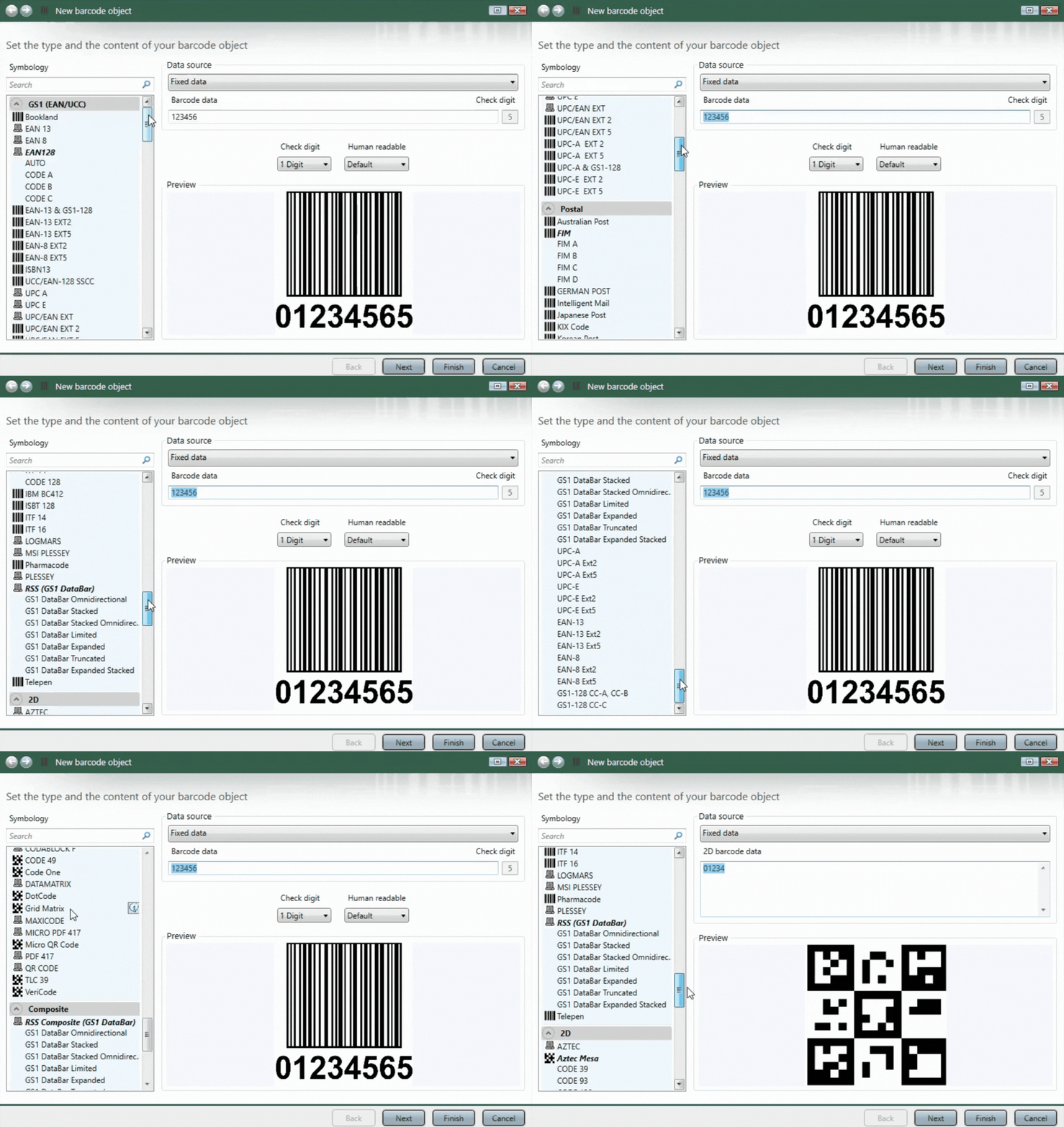
For an even easier breakdown, watch this video: How to Generate a Barcode in LABELVIEW.
To sell products online or in retail stores, you need a unique identification number from GS1. Get started by licensing a GS1 Company Prefix or a GS1 US GTIN.
TEKLYNX partners with GS1 US, so you can get authentic UPC Numbers (GTINs) directly through GS1 US by clicking the appropriate link below. You will be taken directly to the GS1 US store. When completed, come back to TEKLYNX and discover GS1-compliant barcode label design software and use our GS1 barcode generator.
When you create your own barcodes using barcode label design software, your products are registered under your company name; your barcodes include a legitimate Company Prefix, and you maintain brand ownership, credibility, and traceability.
While there are several ways to create barcodes using online tools or workarounds, the most reliable and scalable approach is to invest in professional barcode label design software. Whether your business is just getting started or has grown significantly, professional barcode label design software won't let you down. Some benefits include:
Barcode label design software isn't just another way to create barcodes; it supports your organization with accurate labeling, streamlined operations, and long-term business credibility.
Looking for barcode label design software that fits any budget? TEKLYNX Subscription Licensing is a cost-effective solution that offers more predictable software costs. Enjoy benefits such as access to technical support, unlimited product training webinars, and version upgrades.
SHOP TEKLYNX LABEL DESIGN PRODUCTS
Nick Recht is the Sales Director for the Americas region at TEKLYNX RFID and barcode label solution provider. He leverages his passion for using technology to add value to businesses and his 15 years of AIDC experience to help organizations of all sizes barcode better. When he is not working, he is driving one of his daughters to a practice of some sort or doing a project around the house.
Barcodes are the backbone of supply chain operations. But what does that mean for you and your business? In this blog we explain everything there is to know about barcodes and why they matter.
READ MORE
Barcodes have been used for over fifty years to communicate information between buyers, sellers, distributors, governments, and more. While a barcode could contain any random string of numbers, the power of barcodes is in standards.
GS1 is the organization behind the most widely used barcode standards in the world. Generating accurate GS1 barcodes is a priority for any business. In this blog, we’ll discuss how to generate GS1 barcodes using barcode label design software.
READ MORE
When your labeling software isn't built to scale, it quickly becomes a bottleneck that slows operations and limits business growth. In this blog, we'll explore practical ways to make sure your labeling system can support future growth and maximum scalability.
READ MORE
What do you think? Leave us a comment.
Comments will be reviewed and are subject to TEKLYNX’ comment policy. Your email address will not be published publicly.