Choisissez votre localisation
Sélectionnez votre localisation et votre langue pour la meilleure expérience sur notre site internet
Sélectionnez votre localisation et votre langue pour la meilleure expérience sur notre site internet

National Barcode Day is a reminder of how much businesses rely on barcode labels every day. From manufacturing and retail to logistics and healthcare, barcodes power critical workflows behind the scenes.
Creating a barcode may seem simple, but creating a barcode label that scans reliably throughout the supply chain requires much more than placing lines on a label. Barcode type, print quality and setup, accurate data, materials, and environmental conditions all play a role in long-term performance.
If any part of that process is overlooked, your team might face consequences that can be significant:
To better understand what separates high-performing barcode labels from problematic ones, we asked a few TEKLYNX labeling experts to share their advice on creating accurate, reliable barcode labels.
TRY BARCODE LABELING SOFTWARE FOR FREE
Question 1: What barcode design best practice is often overlooked but makes the biggest difference?
Dominic Bieniewski, TEKLYNX Sales Engineer: Design for consistency across devices and conditions. That means sizing barcodes correctly from the start and ensuring they will print and scan reliably across different printers and environments.
A barcode that looks perfect in a design file may fail once it's printed or applied to packaging. Successful barcode design starts with understanding how the label will be used in the real world.
Some of the most important design considerations include:
One of the first decisions in barcode label design is choosing the right barcode symbology. Each barcode type has a different purpose, so the best choice depends on how the label will be used.
For example, a retail product may need a UPC or EAN barcode. A logistics label may require GS1-128. Smaller items or regulated products may use a 2D barcode, such as GS1 DataMatrix. QR Codes and GS1 Digital Link barcodes are also becoming more common as businesses look for ways to connect physical products to more detailed digital information.
Choosing the wrong barcode type can create problems later. The barcode may not hold the right amount of data, meet trading partner requirements, or scan correctly in the environment where it is used.
Before designing a barcode label, consider:
TEKLYNX barcode label design software helps simplify this process with built-in barcode wizards, including GS1 barcode creation tools in CODESOFT and LABELVIEW. These tools guide users through barcode creation, so they can select the correct barcode type and add the required data with less manual formatting.
For GS1 barcode labels, this may include Application Identifiers for information such as GTIN, lot number, serial number, production date, best-by date, packaging date, or expiration date.
As barcode standards continue to evolve, choosing the right symbology is one of the most important steps in creating labels that support your current needs and future labeling requirements.
Barcode size matters just as much as the barcode type, and barcode readability should be considered throughout the design process, not just at the end.
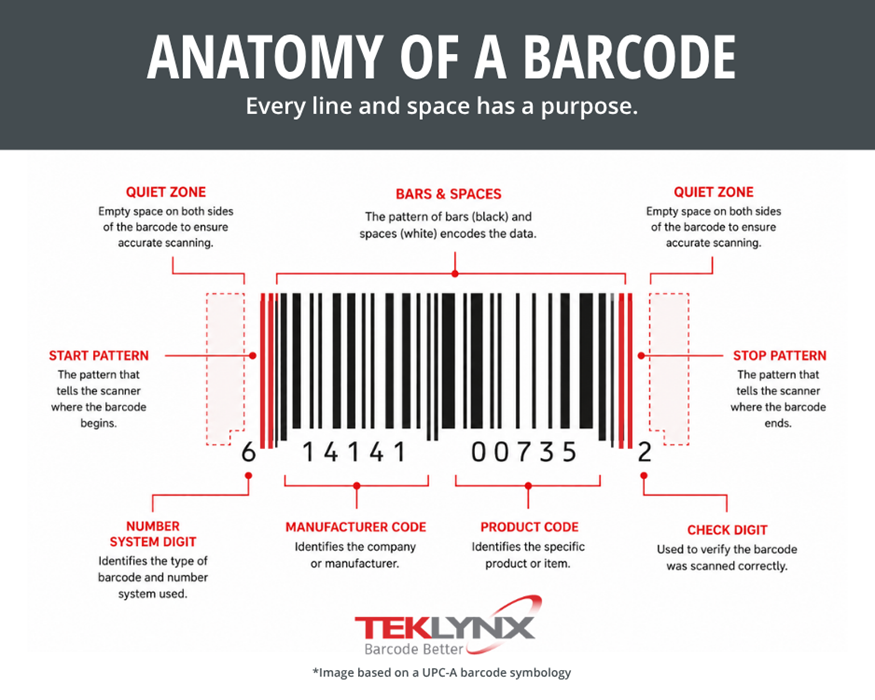
When designing barcode labels, consider these readability factors:
Color can also be part of a barcode label design, but it should be used carefully. Color can support branding, product identification, warnings, or visual organization. The barcode itself should remain clear and easy to scan. Avoid placing graphics, colors, or other design elements too close to the barcode if they interfere with readability.
TEKLYNX barcode label design software allows users to add high-resolution graphics and use exact RGB or CMYK color codes with compatible color printers. These tools can help create more polished labels, but the barcode should always remain the most functional part of the design.
Question 2: What’s a barcode issue people often blame on the barcode when the real problem is something else?
Scott Fabian, TEKLYNX Product Integration Developer: A great barcode label is more than a barcode. It's a combination of the barcode, the material, the placement, the printer, and the environment all working together.
Many barcode issues are often caused by factors outside the barcode itself, like:
Labels may be exposed to heat, cold, moisture, chemicals, sunlight, or frequent handling. What appears to be a barcode failure is often a durability or print quality issue.
Barcode placement also matters. Labels applied to curved surfaces, flexible packaging, or uneven containers can distort the barcode and reduce readability.
The best barcode labels are designed for the entire lifecycle of the product, like shipping and handling, not just the moment the label leaves the printer.
One often overlooked part of barcode quality is printer configuration. A label design is only as reliable as the printer setup behind it. If the printer, driver, label stock, and settings are not aligned, the final label may not print the way it appears on screen.
This is especially important for barcode labels because poor print quality can affect scanability. A barcode that is too light, too dark, distorted, or printed at the wrong size can cause problems in production.
Before printing barcode labels, confirm:
TEKLYNX has developed over 4,000 native label printer drivers to help optimize print quality and printer performance. Native printer drivers help labeling software communicate more effectively with label printers and can support printer-resident features, such as fonts and barcodes.
Printer-resident fonts are installed on the printer itself rather than only on a computer. When used correctly, they can reduce the amount of data sent to the printer, which can help speed up label printing.
Printer setup may sound like a technical detail, but it plays an important role in barcode label design. A well-designed label still needs to print clearly and consistently to work as intended.
Question 3: What is one labeling best practice every company should implement?
Maddie Henry, TEKLYNX Support Engineer: Use a single, trusted source of data and eliminate manual entry when possible.
Manual data entry introduces unnecessary risk through:
A better approach is to create reusable label templates that pull variable data directly from ERP, WMS, MES, or other business systems.
Variable data may include:
This approach helps reduce the number of label files your team needs to maintain. It also makes updates easier because the design and the data are not being managed in dozens or hundreds of separate files.
For example, a company with many product variations may only need a few smart label templates. When it is time to print, the correct product data is pulled into the label automatically.
TEKLYNX barcode labeling software makes it easy to connect label templates to local or cloud-enabled data sources. Database connection tools help users bring variable data into label designs, so teams can create a more consistent and scalable labeling process.
SEE HOW TEKLYNX SIMPLIFIES BARCODE LABEL DESIGN
Question 4: If you could check only one thing before a barcode label goes live, what would it be?
Robert Lenski, TEKLYNX Engineering Team Lead: Verify that the barcode scans correctly using the actual scanners and conditions it will encounter in production.
Testing is often the fastest and least expensive way to improve barcode performance.
Before deployment, organizations should confirm:
A small pilot run or test print can identify problems before they become expensive operational issues.
Some industries may also require barcode verification. Barcode verification grades barcode quality against defined standards and helps confirm that barcodes can be scanned reliably throughout the supply chain.
Testing barcode labels before production helps reduce failed scans, rejected shipments, reprints, and other labeling issues that can slow down operations.
Better barcode label design can improve more than the look of a label. It can help teams print more efficiently, reduce manual errors, improve traceability, and keep labeling processes more consistent.
Barcode label design is also becoming more important as businesses prepare for evolving requirements around 2D barcodes, GS1 Digital Link, and product traceability. Companies need labels that can support accurate data today while remaining flexible enough for future changes.
The best way to design barcode labels is to build a process that supports both design quality and operational efficiency. That means choosing the right barcode symbology, designing for readability, setting up printers correctly, using reusable templates with variable data, and testing labels before they reach production.
Before releasing a barcode label to production, ask yourself these questions:
At TEKLYNX, our labeling experts are always here to help if you have questions on the above. Get in touch with our professional services team.
Designing barcode labels doesn’t have to be complicated. With the right process and the right barcode labeling software, your team can create labels that print accurately and scan reliably.
TEKLYNX barcode labeling software helps businesses design barcode labels, use variable data, leverage native printer drivers, and support evolving barcode requirements. This National Barcode Day is the perfect opportunity to evaluate your labeling process and identify opportunities for improvement before small issues become costly problems.
Ready to improve the way you design barcode labels? Buy barcode label design software or download a free, 30-day trial.
BUY LABEL DESIGN SOFTWARE ONLINE
Blake Janz is one of the Enterprise Account Executives and manages all professional service projects at TEKLYNX. Blake is focused on customer experience by helping organize complex label creation projects and managing implementations of enterprise solutions. Blake works closely with our customer support team and implementation engineers to make sure customers are taken care of no matter the scale of their project. Outside of work, Blake enjoys playing volleyball and spending time with his family.
If you’re looking for how to make labeling easier, the good news is that it doesn’t require a complete overhaul of your labeling process. With the right labeling strategies, companies can reduce errors, save time, and remove frustration from their labeling process.
Read More
There is a common misconception that learning how to create barcodes is expensive, complex, or time-consuming. But modern barcode labeling software solutions offer low up-front costs, easy installation, and provide a foundation for long-term scalability.
READ MORE
TEKLYNX offers three label design software products, each with two editions, so there’s an option to meet any barcode labeling needs! You can start simple and grow into products with more features thanks to upward file compatibility. In this blog, we’ll discuss how to choose between our label design software products.
READ MORE© Copyright 2026 TEKLYNX CORPORATION SAS. Tous les droits sont réservés.
What do you think? Leave us a comment.
Comments will be reviewed and are subject to TEKLYNX’ comment policy. Your email address will not be published publicly.