
Choose Your Location
Please select your location & language for the best website experience
Integrate your label printing system with SAP platforms like ECC or S/4HANA to streamline operations, reduce errors, and improve your return on investment (ROI). Instead of manually typing in your data, labels can be populated automatically by generating print-time data directly from SAP. The result? A faster, more accurate, and cost-effective labeling process.

Universal low-code integration avoids complex system integration and constraints. There are a few ways you can integrate TEKLYNX software with SAP.
For LABELVIEW or CODESOFT, copy the SQL endpoint from SAP HANA, open your labeling software, create a new ODBC connection using the HANA ODBC connector, and paste the SQL endpoint into the host field. You will have to configure the settings as needed and test the connection to ensure it's working. Then, create the database, select the SAP HANA OLE connection and the tables/fields that will be used, and add the data onto the label.
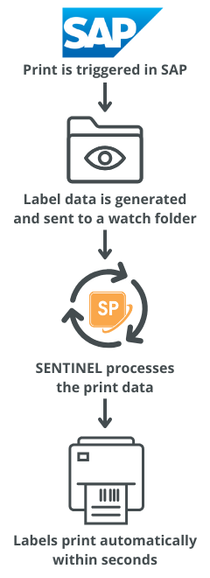
For SENTINEL label print automation software, SAP simply adds a record to a database, generates a flat file, or sends a restful API request with the information needed to print. The label printing system then sees the right record or file and triggers the print job.
At TEKLYNX, our universal integration approach lets you migrate to a new labeling solution without any major changes to your current SAP landscape.
When it comes to upgrading SAP, your integrated barcode label printing software from TEKLYNX will continue to work seamlessly due to universal integration. And if updates are needed, your support contract provides access to our labeling experts and best-in-class support.
Integrating your barcode label printing with SAP helps:
If you answered yes to any of the above, we can help. Get in touch with one of our labeling experts to learn more.
We're here to help you with SAP barcode label printing. Complete the short form to start the conversation, and a TEKLYNX SAP labeling expert will reach out to you.
© Copyright 2026 TEKLYNX CORPORATION SAS. All Rights Reserved.