
Choose Your Location
Please select your location & language for the best website experience

Getting ready for peak season may look different for every industry. Some industries increase inventory. Others hire temporary workers or add production shifts.
But what shouldn’t look different is how you optimize your labeling operations for peak season.
Peak season can expose weaknesses in labeling operations. This doesn’t just mean slow printers and incorrect labels, but disconnected systems, manual processes, outdated label templates, and inconsistent printer configurations that slow labeling down. But you can eliminate those silos, automate repetitive tasks, and ensure labels print correctly the first time.
To help get you there, here are six ways to get your labeling environment ready for a successful peak season and speed up label design and printing.
Your label templates are the foundation of your labeling process. Managing labels can become extremely difficult if every product, customer, or production line requires a separate label file, especially as your business grows, or regulatory requirements change.
Instead, create standardize label templates that use variable data pulled directly from your ERP, WMS, or business system. Rather than maintaining hundreds of nearly identical labels, a single template can populate information dynamically rather than using static text, images, or barcodes.
This not only simplifies label management but also speeds up label design and printing. When operators don’t have to search for the correct label, manually enter data, or make last-minute updates, labels can be printed faster with less room for errors.
A single label using variable data will automatically be able to update:
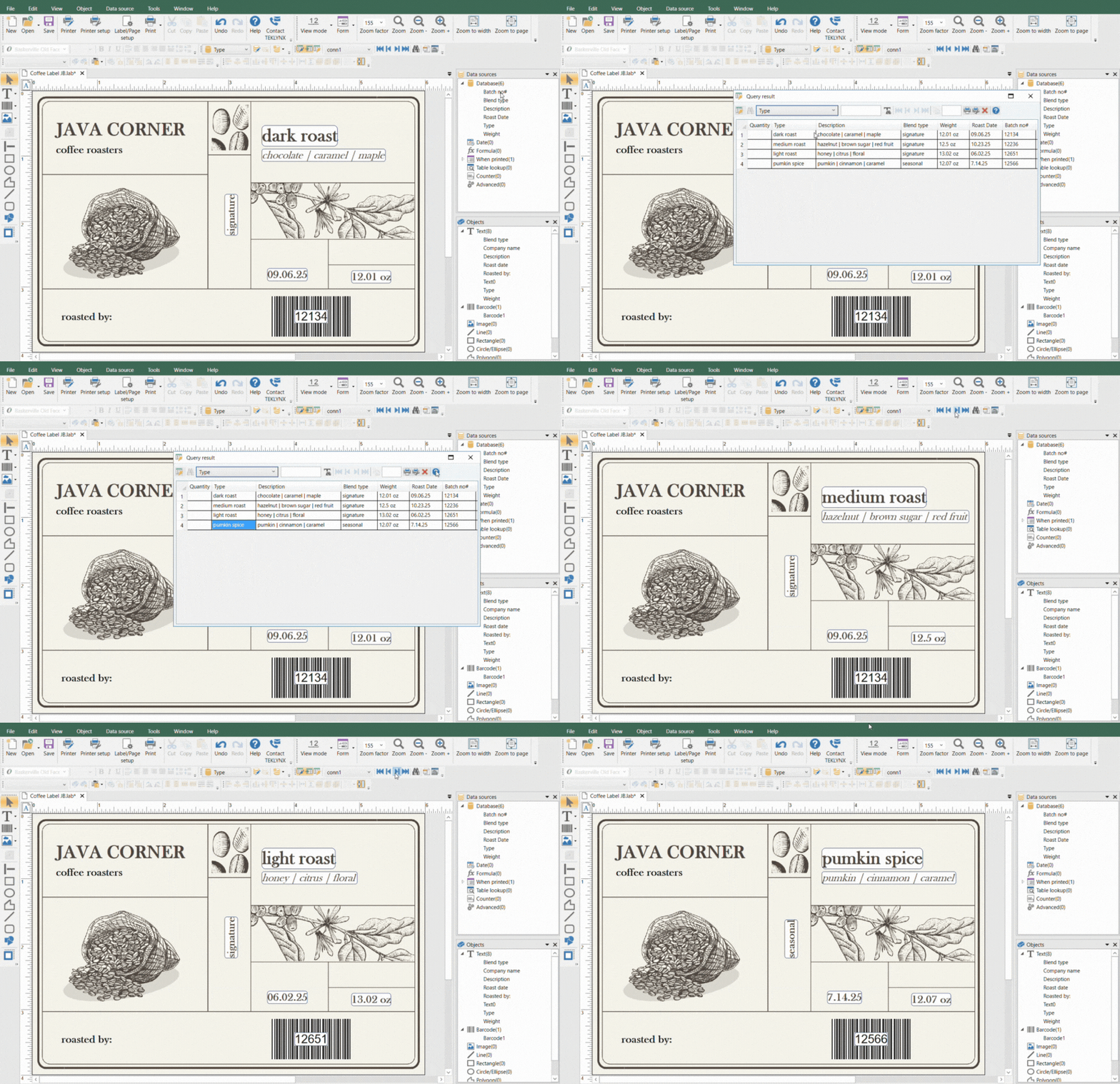
By using this approach, you can easily reduce duplicate templates, improve consistency, and spend less time managing labels. CODESOFT helps organizations design flexible barcode labels that can connect to multiple data sources and create a standardized labeling process.
To effectively use label templates, it’s important to connect your labeling to a data source.
Manual data entry is one of the biggest causes of labeling slowdowns. When design users copy and paste or type information from an ERP, WMS, or spreadsheet into a label, every print job takes longer and introduces another opportunity for mistakes.
Instead, connect your label design and printing software directly to the systems you’re already using. Modern labeling software like TEKLYNX can automatically collect data from ERP, WMS, MES, SQL databases, Excel spreadsheets, APIs, flat files, and more.
By allowing labels to pull already approved data from these sources, you eliminate unnecessary manual data entry, reduce the time it takes to generate a label, and improve consistency.
Integrating systems also help break down information silos. All teams can work from the same trusted data rather than maintaining separate label files, which will reduce errors and create faster workflows from label design to print.
Standardizing label templates and connecting to business systems create the foundation for label printing automation.
Many businesses still rely on the old “print and pray” method. The label designer opens the label, enters the data, selects a printer, and clicks print.
While each step might only take a few seconds, those seconds quickly add up when you’re printing thousands of labels during peak production. They also pull employees away from other tasks and leave room for error which causes a significant bottleneck in operations.
Label print automation removes those daily, repetitive tasks by allowing businesses to trigger print jobs based on pre-defined business rules. Instead of opening your labeling software for every print job, labels are generated and printed automatically when a specific event occurs. With an automated label printing tool, labels can print when:
It’s not ideal to rely on an employee to initiate every print job. By using SENTINEL label print automation software, it determines the label, data, and printer from the information sent from the host system and instantly prints the label without any manual interactions, helping reduce errors!
You can even automate label printing across multiple facilities when you integrate with existing systems.
Now that we have some of the most important steps done, don’t forget to check your hardware.
Communication between your label software and printers plays a critical role in printing speed and overall performance. If this step in your labeling process is overlooked, even well-designed labels and automated workflows can be slowed down by inefficient printer communication.
The way labeling software sends information to a printer directly impacts print speed, print quality, and throughput. One of the easiest ways to optimize printing is by using TEKLYNX native printer drivers.
Native printer drivers ensure clear communication since the software speaks the native language of the printer. This reduces processing time and enables labels to print faster while maintaining accurate What You See Is What You Get (WYSIWYG) output. This means less waiting time at the printer, faster label production, and more time spent keeping products moving through your operation.
Additional ways to improve print performance include:
Improvements like these might seem small but together they will significantly reduce print times and increase throughput in environments that are printing hundreds of labels every day.
Next up is collaboration.
Labeling processes involve multiple teams. IT, Systems Administrators, Operations, QA, Label Designers, and Quality Engineers, all rely on the same labeling tools and approved templates. Without a centralized approach, it’s easy for different departments to maintain separate versions of the same label, which results in inconsistencies, delays, and unnecessary rework.
These disconnected workflows also slow down everyday operations. Something as simple as updating a barcode or making a regulatory change can require multiple emails and approval cycles before the correct label reaches production.
Before peak season, evaluate how your labels are managed across the entire organization.
A centralized labeling strategy helps you:
When all teams use a single source of truth, label updates happen faster, approvals take less time, and production teams can begin printing sooner.
Last but certainly not least, you need to test your environment.
Don’t wait until the busiest time of year to discover problems with your labeling. Before production volume increases and teams get busy, take time to review your labeling environment. Testing your processes ahead of time helps uncover issues before they become production delays.
Ask questions such as:
Once you address all the above, your labeling will be ready for peak season. Answering these questions and verifying everything looks right will minimize disruptions and ensure a stress-free environment.
Peak season puts every part of your operation to the test, and labeling is no exception.
Businesses that maintain efficiency during periods of high demand are integrating labeling environments by standardizing label design, connecting business systems, automating repetitive workflows, and ensuring optimized printer communication.
When these best practices are all in place and working together, companies reduce manual work, improve label accuracy, and increase print performance before production ramps up for peak season.
Whether you’re optimizing label design with CODESOFT or automating label printing with SENTINEL, investing in your labeling environment today will help your operations throughout peak season and beyond.
I WANT TO SPEED UP MY LABELING
Travis Wayne is the Product Manager at TEKLYNX. Travis applies his 20+ years of IT and health sciences experience to empower businesses to streamline operations and barcode better by applying software and technology. He works to continually improve TEKLYNX strategic planning, product and project management principles, and cross-functional communications. When not working, he enjoys many outdoor activities with his wife and two children.
Getting labeling software right has a direct impact on compliance, production speed, and operator frustration, but implementations can go sideways without planning. For IT leaders building the business case for a labeling solution, the details matter: How long will implementation realistically take? Who needs to be at the table? What other systems will be touched?
READ MORE
Printing one label might sound simple, but many companies need to print thousands of labels per day. This can be a challenge when those labels must have unique data. As difficult as it might sound, printing thousands of unique labels per day can be easy with the correct enterprise labeling software.
READ MORE
Have you ever asked this question or heard it from someone on your team? “We keep having unapproved label edits. Is there a way to track every change that is made?” If so, you’re not alone. Accidental label changes are one of the most common problems in labeling operations. The long-term solution isn’t just better training or locking label files with passwords. The real fix is a labeling solution that tracks every change, controls who can do what, and makes sure only approved labels make it to production.
READ MORE© Copyright 2026 TEKLYNX CORPORATION SAS. All Rights Reserved.
What do you think? Leave us a comment.
Comments will be reviewed and are subject to TEKLYNX’ comment policy. Your email address will not be published publicly.